

Have you noticed a grey arrow beside someone’s name on Snapchat and wondered whether your message arrived? The Snapchat Grey Arrow Meaning is usually straightforward: your Snap or Chat is pending rather than successfully delivered. An unaccepted friend request is a common reason, but privacy settings can also matter. Importantly, this symbol alone does not prove someone blocked you. Below, you’ll learn what causes it, which checks actually help, and how other Snapchat icons differ.
What Does the Grey Arrow Mean on Snapchat?
Simple Definition of the Grey Arrow
A grey pending arrow on the Snapchat Chat screen means Snapchat has not confirmed normal delivery of your Snap or Chat. You might also see the word “Pending” beneath a username. Snapchat Support explains that this icon may appear when someone has not accepted your friend request, depending on their privacy settings.
Snapchat Grey Arrow Meaning at a Glance
| Icon or status | Meaning | Common cause | What to do |
| Grey arrow | Pending | Request not accepted | Check friendship status |
| Pending label | Delivery not confirmed | Contact restrictions | Give the person time |
| Colored arrow | Sent | Snapchat processed the message | Check for later updates |
| Opened indicator | Viewed | Recipient opened it | No fix needed |
Does the Grey Arrow Mean Your Snap Was Delivered?
No. Pending does not mean delivered or opened. A sent indicator shows that Snapchat processed an outgoing message; delivered and opened are later states.
Why Does a Grey Arrow Appear on Snapchat?

Your Friend Request Hasn’t Been Accepted
You might send someone a Snap immediately after adding their username. This happens often with newly added contacts. Until they accept your request, the conversation can display a grey pending icon.
If someone asks you to add them using Snapchat slang, understanding the AMOS Meaning on Snapchat can help. AMOS stands for “Add Me on Snapchat,” and sending a friend request does not guarantee immediate message delivery.
Someone Removed You From Their Friends List
If someone removes you, their contact settings may prevent future messages from reaching them. However, the grey arrow cannot confirm that they deliberately unadded you.
The Person’s Privacy Settings Restrict Messages
Snapchat normally limits direct contact to friends. A person may choose settings that restrict messages from people outside their Snapchat friend list.
The Account May Be Blocked or Unavailable
Blocking or an unavailable account can interrupt contact, but neither condition can be diagnosed from the grey arrow alone.
Snapchat May Have a Temporary App or Connection Issue
If several conversations behave strangely at once, check your connection and Snapchat’s service status.
Does a Grey Arrow on Snapchat Mean Someone Blocked You?
Grey Arrow vs. Being Blocked
Being blocked can prevent communication and profile discovery. Nevertheless, a pending icon is not a reliable blocking test.
Grey Arrow vs. Being Removed as a Friend
| Situation | What it suggests | What it proves |
| Pending request | Friendship not established | Nothing about blocking |
| Removed friend | Contact permissions may change | No certain reason for removal |
| Blocked account | Contact may stop | Grey arrow alone proves nothing |
How to Check Your Friendship Status on Snapchat
Open the person’s profile from your Chat screen or search their exact Snapchat username. Look for an option to add them, a pending request, or signs that you’re already friends.
Snapchat also uses friendship emojis to reflect interactions between friends. For example, the Snapchat Red Heart Meaning explains why a red heart appears when two users remain each other’s number one best friend for two consecutive weeks.
How to Fix the Grey Arrow on Snapchat
Check Whether Your Friend Request Is Pending
Visit the recipient’s profile and check for a pending friend request. If they have not accepted it, wait rather than repeatedly sending messages.
Confirm That You and the Recipient Are Friends
Check whether you can view the friendship profile and whether an add option appears. If you’re no longer friends, you can send a new request when appropriate, but acceptance is never guaranteed.
Check Your Internet Connection
Switch between Wi-Fi and mobile data, then reopen the conversation. Try sending a message to an established friend to see whether the problem affects multiple chats.
Update Snapchat and Restart the App
Install an available Snapchat update through your app store. Close and reopen the app, then check whether the status changes.
Clear Snapchat’s Cache if the Issue Continues
Use Snapchat’s in-app cache-clearing option when available. Cache clearing can help with temporary app problems, but it cannot force message delivery or override another person’s privacy settings.
What Happens When the Grey Arrow Disappears?
When Your Friend Request Gets Accepted
After someone accepts your request, Snapchat may process a pending message and update its status.
When a Pending Snap or Chat Changes Status
A new colored arrow or delivery label signals a different message state. An outlined opened icon indicates that a recipient opened the Snap or Chat.
What Happens if Your Message Expires?
Snapchat also uses an icon for pending or potentially expired Snaps and Chats. An expired message should not be treated as delivered.
Grey Arrow vs. Other Snapchat Arrows and Icons
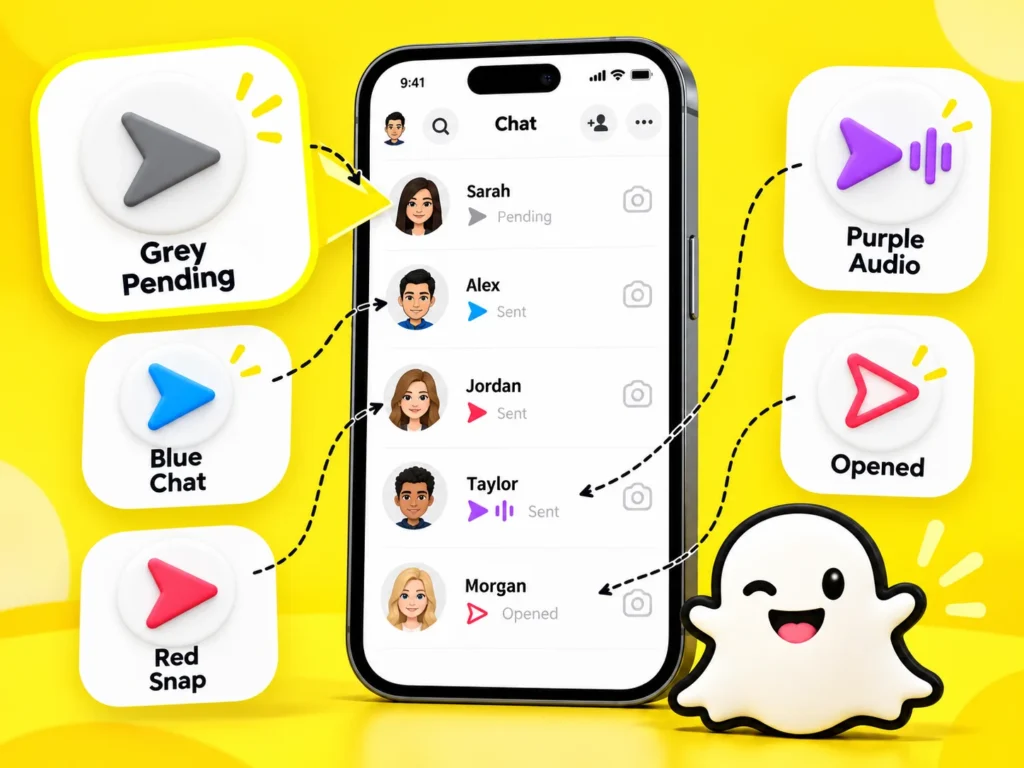
Grey Arrow vs. Blue Arrow
Blue indicates Chat activity; grey indicates a pending status.
Snapchat uses different symbols to explain message and friendship activity. For example, understanding the Snapchat Hourglass Meaning can help you recognize when a Snapstreak is close to expiring, while the grey arrow indicates a pending message.
Grey Arrow vs. Red Arrow
Red represents a Snap without audio, not a pending friend request.
Grey Arrow vs. Purple Arrow
Purple represents a Snap with audio.
Grey Arrow vs. Grey Box
Snapchat’s grey pending or expired symbol differs from its colored sent and opened icons.
| Color or symbol | Typical meaning |
| Grey pending arrow | Snap or Chat pending |
| Blue arrow | Chat sent |
| Red arrow | Snap without audio sent |
| Purple arrow | Snap with audio sent |
| Outlined arrow | Corresponding message opened |
Frequently Asked Questions About Snapchat Grey Arrow Meaning
Does a grey arrow mean someone unadded you on Snapchat?
Possibly, but it does not prove removal. A pending friend request or the recipient’s contact settings can produce similar results. Check your friendship status for more context.
Can someone read a Snap that shows a grey arrow?
A pending icon does not confirm delivery, so you should not assume the recipient can read or view that message. Wait for a delivery or opened status.
Why is there a grey arrow next to one person only?
That person’s friendship status or privacy settings may differ from your other contacts. If other conversations work normally, a general connection problem becomes less likely.
How long does a grey arrow stay on Snapchat?
There is no guaranteed duration. It may change after a request is accepted or remain pending. Some pending messages may expire without being delivered.
Can you remove the grey arrow yourself?
You can check the app and your connection, but you cannot make another person accept your request or allow messages from nonfriends. Avoid unreliable tricks.
Does a grey arrow mean your friend request was rejected?
No. The icon means the message is pending; it does not reveal someone’s decision or motivation. They might simply have overlooked the request.
Final Thoughts on the Snapchat Grey Arrow
The Snapchat Grey Arrow Meaning centers on pending delivery, commonly because a friend request remains unaccepted. Check friendship status and privacy settings first, then troubleshoot the app if several chats behave unexpectedly. Most importantly, never interpret this icon alone as proof of blocking or rejection.